
How to Check FBR Filer Status Online in Pakistan – Complete 2025 Guide

Knowing how to check FBR filer status online in Pakistan is extremely important for every taxpayer, especially after the new FBR reforms in 2025. Whether you want to verify your Active Taxpayer status, check your name in the ATL, or confirm your NTN record, the entire process is now digital, fast, and extremely simple. Millions of Pakistanis benefit from filer status, including reduced taxes on banking, vehicles, property, and business transactions. If you are unsure about your current status, this complete guide will help you check it within minutes.
In this 2025 updated guide, you will learn how to check FBR filer status online using CNIC, mobile number, or NTN, how to confirm your Active Taxpayer List (ATL) status, how to check filer details through SMS, and what to do if you are showing “non-filer” even after submitting tax returns.
What Is FBR Filer Status?
FBR filer status means your name is included in the Active Taxpayer List (ATL) maintained by the Federal Board of Revenue. If your name appears in the ATL, you are officially considered a filer. If not, you are treated as a non-filer and face higher taxes on almost every financial transaction.
The filer status is updated every Sunday by FBR, and newly filed tax returns also get updated according to FBR’s timeline. Being a filer is now essential for banking, property, vehicle registration, passports, investments, and business activities in Pakistan.

How do I check my FBR filer status?
You can check your FBR filer status by visiting the Active Taxpayer List (ATL) on the FBR website. Just enter your CNIC number without dashes, solve the security code, and click verify. If your name appears in the list, you are a filer; if not, you are considered a non-filer. You can also check your status instantly through the Tax Asaan mobile app or by sending an SMS with your CNIC to 9966.
check Also: Breaking News: FBR Launches AI-Driven Audit of 7 Million Income Tax Returns 2025

Can I check my tax filing status online?
Yes, you can easily check your tax filing status online using FBR’s Iris portal or the ATL search system. By entering your CNIC or NTN, you can confirm whether your tax return has been submitted and whether FBR has included you in the Active Taxpayer List. This online verification helps ensure your filings are complete and accepted.

How to check NTN by CNIC?
To check NTN using CNIC, simply open the FBR “Online Taxpayer Verification” portal. Choose the option “Taxpayer Profile Inquiry,” enter your CNIC number, and complete the CAPTCHA. The system will show your registered NTN details if your CNIC is linked to an active tax profile. This method works for individuals, businesses, and companies.

How do I check the status of my ITR?
You can check the status of your Income Tax Return (ITR) by logging into FBR’s Iris portal using your CNIC and password. After logging in, go to “Declarations,” open your tax year, and check whether your return status shows as “Submitted” or “Filed.” Once accepted, FBR updates your Active Taxpayer List status within a few days.
Benefits of Being an FBR Filer (2025 Updated)
Becoming a filer gives you several major financial advantages. Here are the most important ones:
| Benefit | Filer | Non-Filer |
|---|---|---|
| Bank transaction tax | Lower | Very high |
| Vehicle token tax | Lower | Double |
| Property tax | Lower | Higher |
| Prize bond tax | Lower | Higher |
| Withholding tax | Reduced | Higher |
| Passport fees | Lower | Higher |
| Business registration | Easy | Difficult |
| NTN verification | Yes | No |
| Imports/exports | Allowed | Restrictions |
These differences show why every citizen must check their filer status and stay active in the ATL.
How to Check FBR Filer Status Online – 2025 Updated
There are three official ways to check your filer status in Pakistan:
- Check filer status online through FBR ATL website
- Check filer status through FBR Tax Asaan App
- Check filer status through SMS using CNIC
All methods are official, authentic, and updated for 2025.
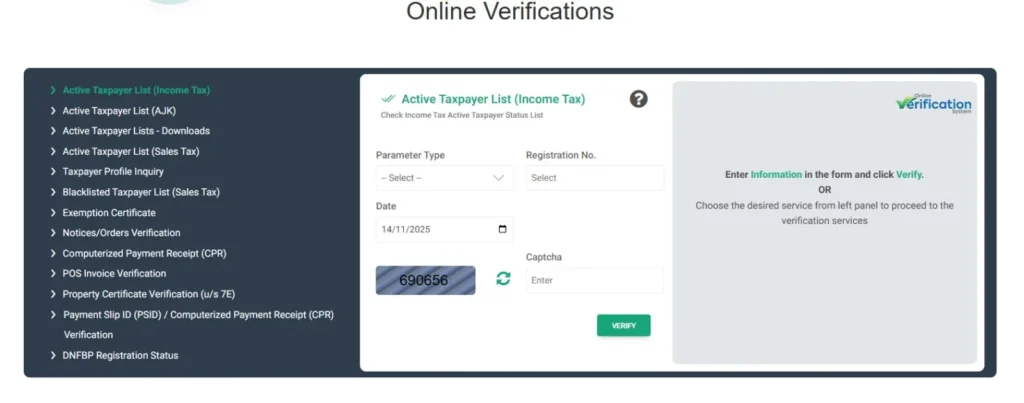
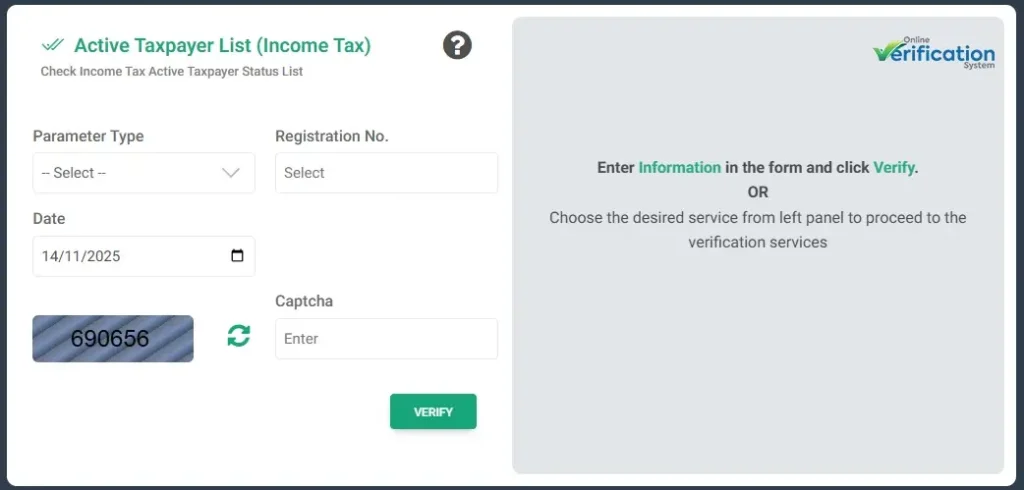
Method 1: Check FBR Filer Status Online via ATL Website
This is the most commonly used and accurate method. Here’s how to do it step by step:
Step 1: Visit the FBR ATL Portal
Open your browser and go to:
FBR Active Taxpayer List (ATL) website (official)
Step 2: Select Your Tax Type
You will see two types:
- ATL for Income Tax
- ATL for Sales Tax
Most people need Income Tax ATL for filer status.
Step 3: Enter CNIC or NTN
Write your 13-digit CNIC without dashes if you are an individual taxpayer. Business individuals can enter their NTN.
Step 4: Solve the CAPTCHA
This confirms you are not a robot.
Step 5: Click “Verify”
If your name appears, you are a filer. If it shows “No record found”, it means you are a non-filer.
✅ Check Active Taxpayer status by SMS Type "ATL (space) 13 digits Computerized National Identity Card (CNIC)" and send to 9966.
🏢 Check Active Taxpayer status of AOP and Company by SMS through the following procedure: Type "ATL (space) 7 digits National Tax Number (NTN)" and send to 9966.
Method 2: Check FBR Filer Status Using the Tax Asaan App
FBR’s official mobile app “Tax Asaan” provides a fast way to check filer status anywhere.
Step-by-Step Guide
- Go to Google Play Store or Apple App Store
- Search for “Tax Asaan – FBR Pakistan”
- Install the app and open it
- Tap Active Taxpayer List
- Enter your CNIC or NTN
- Tap Search
Your filer status will appear instantly on the screen.
This method is especially useful for people who frequently need to verify status for banking, vehicle registration, or property purchase.
Method 3: Check FBR Filer Status via SMS
This method works when you don’t have internet access.
How to Check via SMS?
Simply send:
ATL(space)Your CNIC Number
Send it to: 9966
Example:
ATL 3520212345678
FBR Filer Status Online in PakistanWithin seconds, you will receive a message showing whether you are a filer or non-filer according to the latest ATL.
How to Verify NTN (National Tax Number) Online
Many people want to confirm if their NTN exists before checking filer status. Here’s the process:
Step-by-Step Process
- Visit the FBR Online Verification Portal
- Select “Taxpayer Profile Inquiry”
- Enter your CNIC / Passport / Registration number
- Write CAPTCHA and verify
If your data appears, your NTN is valid and active.
Why Am I Showing as a Non-Filer Even After Filing Tax Returns?
This is one of the most common issues taxpayers face. Here are the major reasons:
1. You filed your tax return after the ATL deadline
FBR issues ATL once a year. If you file late, your name appears in next year’s list.
2. Your tax return is submitted but not verified
Sometimes system delays cause temporary non-filer status.
3. Errors in return submission
Wrong CNIC, missing details, or incomplete forms can cause issues.
4. FBR system update pending
FBR updates ATL every Sunday, so status may take a few days to refresh.
How to Become an FBR Filer in 2025
If you want to change your non-filer status to filer, follow these simple steps:
Step 1: Register for NTN
Visit FBR website and apply for NTN using your CNIC.
Step 2: Create an Iris Account
Iris is FBR’s online tax filing portal.
Step 3: Submit Your Tax Return
Enter income, expenses, deductions, and file your tax return.
Step 4: Submit Wealth Statement
A wealth statement is compulsory for individuals.
Step 5: Verify Your Submission
After successful submission, FBR will update your filer status.
How to Check Your Name in the ATL After Filing Returns
If you recently submitted your tax return, you can confirm your filer status by:
Method 1: Visiting the ATL Portal
Enter CNIC and check if your name is listed.
Method 2: Using Tax Asaan App
Use the ATL section to see updated status.
Method 3: SMS Check
Send your CNIC to 9966 (ATL service).
Usually, status updates within 48 hours, depending on FBR’s schedule.
Common Problems Users Face While Checking Filer Status
Many users report these issues:
1. Website Not Loading
Due to heavy traffic during deadlines.
2. Wrong CNIC Format
Enter CNIC without dashes.
3. Name Not Found
You may not be included in the latest ATL.
4. System Error (Server Busy)
Try again after some time.
FAQs – How to Check FBR Filer Status Online in Pakistan (2025):
1. How can I check if I am a filer or non-filer?
Use the ATL website, Tax Asaan app, or send SMS to 9966 to instantly check your status.
2. How do I check filer status with CNIC?
Go to the ATL portal, enter your CNIC without dashes, and verify.
3. What does it mean if my name is not in ATL?
It means you are a non-filer and will be charged higher taxes.
4. How often is ATL updated?
FBR updates ATL every Sunday.
5. How to check NTN online?
Go to the FBR online verification portal and enter CNIC.
6. How long does it take to become a filer?
Normally 24–48 hours after submitting your tax return.
7. How much tax do non-filers pay?
Non-filers pay double or higher taxes on most transactions.
8. Do I need to file returns every year?
Yes, filing returns every year is compulsory to stay active in the ATL.
Check Also: Breaking News: FBR Recovers Rs 840 Million from Lahore Leather Manufacturer ATS Synthetics – Full Details
Conclusion – Check FBR Filer Status Online in Pakistan
If you want to avoid high taxes and enjoy financial benefits, you must know how to check FBR filer status online in Pakistan using the official ATL system. Whether you choose the FBR website, Tax Asaan app, or SMS method, the entire verification process is simple and takes only a few seconds. Staying a filer not only protects your finances but also strengthens your credit history, business credibility, and government compliance. Make sure to check your filer status regularly and update your tax returns every year to remain in the Active Taxpayer List for 2025 and beyond.